


Based on extensive hands-on testing across blogs, small business sites, and eCommerce stores since early 2024, this review assesses Hostinger’s performance, features, and pricing for 2026.
Hostinger delivers strong speed with LiteSpeed servers and caching, reliable 99.9% uptime, and a beginner-friendly hPanel. While introductory pricing is low, renewal rates increase. It suits small to mid-sized sites but lacks phone support and may struggle with very high traffic.
Disclosure: We are reader-supported. When you buy through links on our site, we may earn an affiliate commission — at no additional cost to you. Learn more.
I started using Hostinger at the beginning of 2024 without really knowing how well it would perform. Sure, the low pricing and solid features looked great on paper, but I wanted to see how it actually worked in real scenarios.
So I tested it across a few different projects—checking site speed, uptime, and how their support team handled real issues. This review is based entirely on what I experienced myself, not just specs or marketing claims. If you’re thinking about using Hostinger, this should give you a real-world look at how it performs day to day.
Hostinger Review 2026

In 2026, we tried out Hostinger on different sites to check its performance, price, and ease of use. From setup to speed and support, here’s what we found from real-world use of this popular budget host.
Summary
I’ve worked directly with Hostinger on client projects and tested it a lot in 2026. It’s truly one of the best budget hosting options, especially for beginners and small businesses.
The interface is easy to use, the setup is straightforward (even if you’re not familiar with DNS or WordPress), and the speed from LiteSpeed servers is impressive for the price. Their AI website builder and one-click tools make it way easier when you’re starting your first site.

Table of Contents
- My Honest Experience After Using Hostinger in 2026
- Hostinger Review: What Stood Out to Me
- Hostinger Services & Features Highlights (Quick Table Overview)
- Hands-On Hostinger Review: My Experience, Pros & Cons
- Deep Dive: Hostinger’s Most Useful Features in 2026
- Hostinger Pricing Explained — Real-World Perspective
- Hostinger Pricing, Domains & Real Savings
- Hostinger Performance Review: Speed, Uptime & Real Tests
- User Experience Insights from Hostinger Review
- Hostinger Customer Support: My Honest Experience
- Final Thoughts: Is Hostinger Worth It in 2026?
- Hostinger vs GoDaddy (2026): Which One Is Better ? (A Quick Comparison Table)
- FAQs
- Is Hostinger good for beginners in 2026?
- How fast is Hostinger’s web hosting?
- Can I rely on Hostinger’s customer support?
- Does Hostinger really offer value for money?
- Is Hostinger suitable for professional or growing websites?
- What’s the biggest downside I noticed?
- Would I personally recommend Hostinger in 2026?
My Honest Experience After Using Hostinger in 2026
Let’s be real—finding quality web hosting that won’t burn a hole in your wallet is getting harder these days. If you’ve been looking around for budget-friendly yet reliable hosting, you’ve probably come across Hostinger more than once. And honestly, there’s a good reason for that.
In this post, I’ll walk you through my honest experience after using Hostinger—covering everything from features and speed to pricing and support. Whether you’re launching a new blog or building a site for your business, you’ll find out if Hostinger is a smart pick in 2026.
A Quick Look Back
Hostinger started out in 2004 with a free hosting service (000Webhost), and over the years, it’s grown into one of the most affordable yet reliable hosting platforms. Today, millions use Hostinger for its fast performance, beginner-friendly dashboard, and affordable plans.
Hostinger Review: What Stood Out to Me
Right from the start, a few things made Hostinger stand out:
-
A free domain and SSL included in most plans
-
An easy-to-use dashboard (great for beginners)
-
LiteSpeed servers for noticeably faster website load times
-
24/7 customer support in multiple languages
-
Global data centers to ensure solid uptime, wherever your audience is
If you’re running a blog, setting up a portfolio, or building your first business site, Hostinger makes it easy to get started—without the usual tech headaches or high costs.
Hostinger Services & Features Highlights (Quick Table Overview)
-
Shared Hosting
-
WordPress Hosting
-
eCommerce Hosting
-
VPS Hosting
-
Cloud Hosting
-
Email Hosting
-
And Affordable Domain Registration
| ⭐ Rating | 4.7 |
| 💲 Price | ₹149.00/month ($2.99/month) |
| ⚡ Speed | 1.1 sec |
| 🕒 Uptime | 99.9% |
| 🔗 Free Domain | ✅ Yes |
| 🌎 Data Centers | India, US, UK, Asia, and South America |
| ➡️ Migrations | Unlimited |
| 👨💻 Support | Live Chat, Email, Phone |
| 🛡️ Security | Free SSL, DDoS Protection, 2FA, Firewall, Malware Protection, Vulnerability detection, Domain WHOIS Protection, IP Blocking |
| 🔄 Backups | Weekly Backups, Daily Backup* |
| 💰 Money Back Guarantee | 30 Days |
| 🔥 Coupon Code | Hostinger coupon 78% + 20% OFF extra |
👉 Quick Verdict: If you’re in a hurry — Hostinger offers powerful features at a budget price.
🔗 Get Upto 90% Off Now with Our LinkNo coupon code required – our link auto-applies the maximum discount.
Hands-On Hostinger Review: My Experience, Pros & Cons
After using Hostinger for several months on client and personal projects, I’ve formed a pretty clear opinion about where it shines—and where it falls a bit short. Here’s an honest breakdown based on hands-on use, both the good and the not-so-good.
Hostinger Pros
-
Fast Speeds
Our test site consistently loaded under 1 second. LiteSpeed servers really do the job. -
Easy-to-Use Dashboard
Hostinger’s hPanel felt intuitive — even easier to navigate than cPanel for basic tasks. -
Free Domain & SSL
No need to buy these separately. Saves time and money right from the start. -
24/7 Support
Live chat helped resolve a plugin issue within minutes — and they support multiple languages. -
Affordable Pricing
Compared to other major hosts, the feature-to-cost ratio here is impressive. -
Global Data Centers
We tested sites targeting India and the US — speeds were solid in both. -
One-Click Installs
Setting up WordPress took less than a minute. No fuss, just works. -
Automated Backups
Used the backup restore feature once — surprisingly quick and easy. -
AI Website Builder
The AI tool gave us a working layout in minutes. Great for non-designers.
Hostinger Cons
-
No Phone Support
If you like talking to someone directly, the absence of phone support can be frustrating. -
hPanel Learning Curve
If you’re used to cPanel, adjusting to hPanel takes a bit of time. -
Basic Plan Limitations
The entry plan only lets you host one website — fine for starters, but restrictive if you grow. -
Renewal Costs Are Higher
Initial pricing is great, but renewals can feel steep. Something to plan for long term. -
Fewer Developer Tools
No built-in staging or advanced SSH tools. May feel limited if you’re a dev. -
No Free Daily Backups on Basic Plans
Daily backups exist, but only on higher-tier plans — you’ll pay extra otherwise.

Deep Dive: Hostinger’s Most Useful Features in 2026
1. LiteSpeed Technology for Better Speed
After trying out Hostinger’s LiteSpeed servers myself, I was genuinely impressed. Pages loaded quickly, and everything felt smooth—no annoying lag or delays. We’ll dive into a live speed test shortly so you can see the real performance for yourself.
Here’s what I personally liked the most during testing –
-
LiteSpeed Servers = Real Speed Gains
We tested Hostinger on several sites. With LiteSpeed servers, load times dropped under 1 second. -
LiteSpeed Cache Plugin Just Works
Zero tech gymnastics required. Just grabbed the free LiteSpeed Cache plugin for WordPress, hit “activate,” and bam, my site’s speed scores shot up. Didn’t even have to tinker around or pray to the server gods. -
Core Web Vitals Got Better
After switching, metrics like First Input Delay and Largest Contentful Paint got a solid boost. That means better SEO and faster site interaction — things Google (and visitors) care about. -
NVMe SSD + Global CDN = Faster Everywhere
Thanks to their NVMe SSDs and built-in CDN, pages felt quicker no matter where visitors were—whether in the US, India, or Europe, content loaded fast and smoothly. -
From Apache to LiteSpeed – Big Upgrade
Before Hostinger, we had a few sites running on standard Apache servers. Switching to LiteSpeed didn’t just speed up the front-end; the WordPress dashboard felt much quicker too.

Another big plus? Hostinger has data centers spread out around the world. It means website can load faster for visitors, worldwide.

2. Managed WordPress Tools Built for Beginners (Hands-On Experience)
One of the things I really liked about Hostinger was their easy-to-understand WordPress setup. Here’s what actually helped my workflow, after testing their tools across a few small sites (a client blog, a demo WooCommerce setup):
Here’s what I personally liked the most during testing.
-
One-Click WordPress Install
I was able to install a new WordPress site in less than a minute. No FTP, no database manipulation — just click and go. -
Auto Updates via hPanel
With the flick of a switch, I turned on automatic updates. No longer do you need to manually check all of your plugins which is a huge time saver on client sites. -
Staging Environment
This feature allowed me to experiment with design changes but without risking the active site. One click and I had a running clone. -
Easy Object Caching Control
Hostinger even bakes cache management into the dashboard itself — no separate tools or server adjustments required. -
Pre-Enabled LiteSpeed Cache
My site was significantly faster upon install. No additional setup, no speculation — just in the bag performance. -
One click and the Maintenance Mode is ON
Handy for redesigns — I was able to toggle off broken layouts in hPanel immediately. -
One-Click HTTPS
SSL was auto-installed. It was one click to enforce HTTPS — no fiddling in settings. -
Multisite Ready
You know when nothing ever quite works as easily as the Best Case Scenario example? Organizing many WordPress installs from a single place went more smoothly than I anticipated. Installation was straightforward and can easily be done by most installers. -
Smooth Site Migration
I transferred an existing site in minutes with Hostinger’s free tool, without any downtime or errors.

3. Solid Security, No Extra Cost
From our experience managing multiple client sites on Hostinger, their built-in security features give real peace of mind — without charging extra.
-
Free SSL for Every Site
No setup headaches — SSL is auto-installed, and HTTPS is ready to go. -
DDoS Protection That Works
We had a small client site face a bot flood. Hostinger’s protection kicked in and kept it online. -
Daily & Weekly Backups
I’ve restored a few sites after plugin updates broke layouts. Having automatic backups saved hours of stress. -
Web Application Firewall (WAF)
Blocks threats before they even reach your WordPress site. It’s always running in the background. -
Two-Factor Authentication (2FA)
Enabled 2FA on our main admin account — takes a few seconds to set up and adds a solid layer of protection. -
Malware Scanner
The built-in scanner caught outdated scripts on one of our demo sites. Fixed it before it caused damage. -
Auto Updates for WordPress
Core updates and plugins stay current, which helps close common security gaps automatically. -
SSH Access for Advanced Users
When we needed to troubleshoot server-level issues, secure SSH access was right there — no hoops to jump through. -
IP Blocklist Control
We used this to block brute force attempts from known IPs — super easy to manage from the dashboard.
Overall, Hostinger bundles in the kind of security that other hosts either skip or lock behind higher-tier plans. It’s reliable, and more importantly, it just works in the background while you focus on building your site.

4. Automated Backups You Can Count On
After breaking a site with a rogue plugin update (we’ve all been there), Hostinger’s backup system saved us—twice. It’s not just a checkbox feature; it’s genuinely helpful when you need it most.
-
Automatic Backups (Daily or Weekly)
Depending on your plan, Hostinger quietly backs up your site in the background. No setup needed. When something goes wrong, you’ve got a restore point ready. -
One-Click Restore Options
What impressed us was the flexibility:-
Restore the entire site
-
Just the database
-
Or specific files all in one click. We used the files and database restore option after a corrupted form plugin, worked like a charm.
-
-
Manual (On-Demand) Backups
Making changes to your site? You can trigger a backup beforehand. We did this before a theme overhaul to stay safe. -
Secure Storage
Backups are stored on Hostinger’s own infrastructure. We’ve never had an issue accessing them when needed. -
Backup Notifications
You get alerts when a backup is completed or fails — a small but reassuring touch. -
Download to Local
Need a copy for extra safety or migration? You can download your full backup in one click. We used this to migrate a site to staging before redesign.
In short: Hostinger makes backups easy, flexible, and accessible — no extra tools or plugins required. That’s a big win for site owners who want peace of mind without micromanaging everything.

These features make Hostinger a reliable option for website owners focused on data security. For more details, Check Backup feature on Hostinger.
5. Great Resources, Even on Entry Plans
We’ve hosted multiple client sites on Hostinger—from simple blogs to starter eCommerce stores—and resource limits were rarely a concern. Here’s what stood out:
-
Plenty of Storage (Even on Basic Plans)
The basic shared plan includes 25 GB of SSD storage. To give you a better idea, that’s more than many leading hosts offer, which is more than enough for blogs, portfolios, and small businesses. -
Email Included (Lots of It)
We were able to create up to 50 email accounts straight from the dashboard. No need for extra services. It’s perfect for small teams or managing admin and support inboxes separately. -
Unmetered Bandwidth
One of our blog posts got a lot of attention on Reddit, and the site handled it really well. No slowdowns or extra fees—just steady traffic. -
Room to Scale
If you need more, higher-tier plans offer up to 100 GB SSD and unlimited bandwidth. We moved an online store to the Business plan and saw better performance without needing cloud hosting. -
Cloud Hosting Note
The Cloud Startup plan is fast (really fast), but users with storage-heavy needs might want to consider upgrading to Cloud Professional or above. -
Great for Budget online Store
We tested the Business Shared plan with WooCommerce—it handled product pages, checkout, and plugins without strain. Solid entry point for online shops. -
Transparent Specs + Helpful Support
Hostinger lists CPU, RAM, and limits clearly. When we had a question about I/O limits, support gave a straight answer in minutes.
In short: whether you’re starting small or planning to grow, Hostinger gives you space to breathe—without the hidden restrictions you’ll find elsewhere.
Hostinger CPU & RAM Specs – What You Really Get
| Hosting Plan | CPU Cores | RAM | Use Case (From Experience) |
|---|---|---|---|
| Single Web Hosting | 1 Core | 768 MB | Good for small hobby blogs, simple HTML sites, or testing. Feels tight when using heavy plugins. |
| Premium Web Hosting | 1 Core | 1 GB (1024 MB) | Fine for basic WordPress setups. Dashboard performance is decent unless you pile on plugins. |
| Business Web Hosting | 2 Cores | 1.5 GB | Best value for WooCommerce or Elementor users. Backend loads faster and fewer timeout errors. |
| Cloud Startup | 2 Cores | 3 GB | We tested this with client sites—it’s smooth under load and handles spikes without sweating. |
| Cloud Professional | 4 Cores | 6 GB | Feels like a VPS. Ideal for developers, agencies, or traffic-heavy blogs. No resource choking. |
| Cloud Enterprise | 6 Cores | 12 GB | Used this for a multisite project. Everything was snappy—even with multiple domains and users. |
✅ Specs adapted from Hostinger’s documentation, based on real-world usage.
Why It Matters:
-
CPU and RAM are important. They impact how quickly your site loads, how smoothly your admin dashboard operates, and how well your site holds up when there’s a lot of traffic.
-
Upgrading to a higher plan makes things run more smoothly. We noticed fewer problems, like slow backend, failed plugin updates, or 504 errors after moving from Single to Business.
-
If your site is growing, it’s best to go with Business or higher. Premium works for beginners, but as your traffic or plugins increase, the extra core and RAM really make a difference.
After purchasing a hosting plan from Hostinger, you can view the complete resource allocation and monitor your usage directly from the hPanel dashboard.

6. Free Domain + Global Speed Boost with Cloudflare
What We Noticed from Real Use:
| Feature | Our Experience |
|---|---|
| Cloudflare CDN | Improved load speeds globally — especially for traffic from outside our hosting server region. Less lag, faster delivery. |
| Free Domain (1st Year) | Hassle-free setup. Great starter bonus for new sites. Easy to manage everything from Hostinger’s dashboard. |
Why It Matters:
- No extra fees for a domain name during year one.
- Your site feels snappy even for global visitors — which helps both UX and SEO.
Activate Cloudflare early from hPanel — it takes just a few clicks, and the performance bump is worth it.
Read Also | Speed Up WordPress Site: Top 5 CDN Providers to Boost Performance
Hostinger Pricing Explained — Real-World Perspective
If you’re just getting started, Hostinger’s pricing feels like a win. We’ve used their Premium and Business plans across multiple projects—and here’s the honest take:
Low Starting Price, But Watch the Renewals
Hostinger’s shared hosting kicks off at just ₹149/month (or $2.99/month). That’s what drew us in—it’s genuinely affordable for launching a blog or business site.
But like most hosts, the renewal price goes up. That same Premium plan jumps to ₹599/month ($7.99/month) after the first billing term. So, yeah—it’s not too surprising, but something to plan for.
Lock in the lowest price by going with the longest term up front (like 2 or 4 years). We did, and it paid off.
Skip the ₹89/month Plan in India (Seriously)
Yes, there’s a Single Web Hosting plan advertised at ₹89/month. We tried it—and hit walls quickly. It’s fine for experimenting, but not for real growth. Limited features, slower speeds, and no breathing room. Avoid it if you’re building anything beyond a basic test site.
Hostinger Plan Breakdown: What We Actually Used
Here’s a breakdown of the three plans we tested—Premium, Business, and Cloud Startup—and how they stack up from a practical, user-first point of view:
| Feature | Premium | Business | Cloud Startup |
|---|---|---|---|
| Starting Price (4-Year Term) | ₹149/mo | ₹249/mo | ₹599/mo |
| Websites | 3 | 50 | 100 |
| Storage | 20 GB SSD | 50 GB NVMe | 100 GB NVMe |
| Bandwidth | Unlimited | Unlimited | Unlimited |
| Databases | 10 | 150 | 300 |
| Performance | Standard | Higher resources + CDN | 20x more power |
| Dedicated IP | ❌ | ❌ | ✅ |
| CDN | ❌ | ✅ | ✅ |
| SSL | Unlimited free SSL | Unlimited free SSL | Unlimited free SSL |
| Email Accounts | 2 mailboxes per website – free for 1 year | 5 mailboxes per website – free for 1 year | 10 mailboxes per website – free for 1 year |
| Backups | Weekly | Daily + on-demand | Daily + on-demand |
| Support | 24/7 support | 24/7 support | Priority expert support – 24/7 |
| Extras We Noticed | Free domain for 1 year + email marketing for 1 year | Free CDN, AI WordPress tools, Node.js apps, ecommerce tools | Dedicated IP, priority support, power boost, 100 PHP workers |
| Downsides | Only 3 websites, no CDN, SSD storage | No dedicated IP, lower resources than Cloud Startup | Costs much more than Business for smaller sites |
| Best For | Small personal or starter websites | Growing business, ecommerce, and WordPress sites | High-traffic sites, agencies, and resource-heavy projects |
| PHP Memory Limit | 2048 MB | 3072 MB | 4096 MB |
| Uptime Guarantee | 99.9% | 99.9% | 99.9% |
Final Thoughts on Hostinger Pricing
We’ve hosted both client and personal projects with Hostinger for over a year. Even with the post-introductory pricing, you’re getting solid features, great performance, and responsive support—without the premium price tag of bigger brands.
It’s not the cheapest forever, but if you choose the right plan and term length, it delivers great value long-term.
💬 Need help choosing a plan? We’re happy to share what worked for different use cases.
Hostinger Pricing, Domains & Real Savings
Hostinger often runs discounts—and in our case, the savings were legit. We signed up during a sale and got a great deal, plus an extra 20% off using a coupon (link below).
You’ll also get a free domain for the first year, which helps cut setup costs. After that, .com renewals are around ₹1,199/year ($9.99)—fairly standard.
Go with a longer plan if you can. We did it to lock in the low rate, and it saved us from paying higher renewal prices too soon.
🔥 Limited-Time Bonus: Extra 20% OFF Hostinger’s Biggest Deal
Get 20% extra OFF — on top of Hostinger’s 77% deal!
👉 Unlock Extra 20% Savings NowUnlock this exclusive bonus discount with our special link – no coupon code required. Limited-time offer!

Hostinger Performance Review: Speed, Uptime & Real Tests
When you’re looking at hosting, it’s not just about speed. It’s also about how well it performs when actual users come to your site from different places and at different times. Instead of just doing a standard speed test, we really pushed Hostinger’s Premium Hosting plan to see how it handled tough scenarios. We set up a live WordPress and WooCommerce site using their India data center. The results we found show what it’s like to use it in the real world, not just in a test environment.
Unlike other reviews, I actually tested Hostinger using GTmetrix and real-time load tests from India. Below are the screenshots and test results.
Hostinger’s Performance Tests Overview
To give you real-world insights, we ran multiple tests using trusted performance tools. Here’s what we measured:
-
Speed Test – Checked how fast the site loads for users.
-
Server Response Time (TTFB) – Measured how quickly the server reacts to a request.
-
Uptime Monitoring – Tracked reliability over time to ensure minimal downtime.
-
Stress Test – Simulated heavy traffic to see how the server holds up.
-
Core Web Vitals – Evaluated Google’s key UX metrics like LCP, FID, and CLS for load speed, interactivity, and layout stability.
We used a live WordPress + WooCommerce site hosted on Hostinger Premium (India data center) to make the tests more realistic and relatable.

1. Global Speed Test Results – GTmetrix
We used GTmetrix to check how our site performs from different places around the world. We ran each test in two different situations:
Scenario 1: Caching Disabled
We tested Hostinger’s performance using GTmetrix with specific settings to measure its speed and efficiency.
- Lightspeed Caching: Disabled
- CDN: Disabled
Here are the results of the test, shown in the table below:
| Country | Performance Score | Page Load Time |
|---|---|---|
| India | 99% | 0.8s |
| Canada | 75% | 3.3s |
| Brazil | 67% | 4.7s |
| Australia | 87% | 2.4s |
| USA | 74% | 3.8s |
| UK | 91% | 1.9s |
| China | 97% | 1.3s |

My Takeaway: If there’s no caching, where the server is located really affects how fast things load. Places close to the server, like India and China, load quickly, while countries like Brazil and the USA that are further away experience slower load times.
Scenario 2: Caching Enabled
To understand how Hostinger performs under real-world conditions, we ran a series of speed tests using GTmetrix.
- Lightspeed Caching: Enabled
- CDN: Disabled
The site we tested is hosted on Hostinger’s India-based server, running WordPress with WooCommerce, which adds a bit more load—ideal for realistic testing.
| Country | Performance Score | Page Load Time |
|---|---|---|
| India | 94% | 1.3s |
| Canada | 79% | 2.8s |
| Brazil | 82% | 3.0s |
| Australia | 96% | 1.5s |
| USA | 89% | 2.2s |
| UK | 97% | 1.3s |
| China | 93% | 1.7s |

My Takeaway: With caching on, performance got a lot better everywhere, especially in the US and Brazil, where load times went down by 1.5 seconds. This shows how effective LiteSpeed caching can be, even without a CDN.
2. TTFB Test – How Fast the Server Responds
Time to First Byte (TTFB) shows how quickly the server reacts when someone visits your site. We tested Hostinger’s server response times from different parts of the world—and here’s how it performed across locations.
| Location | Status | DNS | Connect | TLS | TTFB |
|---|---|---|---|---|---|
| Frankfurt | 200 | 32.52 ms | 116.02 ms | 134.75 ms | 392.34 ms |
| Amsterdam | 200 | 35.24 ms | 122.09 ms | 132.7 ms | 373.48 ms |
| London | 200 | 43.09 ms | 138.19 ms | 172.26 ms | 448.6 ms |
| New York | 200 | 36.51 ms | 191.65 ms | 211.62 ms | 595.56 ms |
| San Francisco | 200 | 29.84 ms | 237.82 ms | 252.35 ms | 730.32 ms |
| Singapore | 200 | 29.01 ms | 58.05 ms | 70.96 ms | 186.71 ms |
| Sydney | 200 | 111.84 ms | 155.12 ms | 242.4 ms | 552.52 ms |
| Bangalore | 200 | 30.27 ms | 16.03 ms | 32.37 ms | 63.2 ms |
Insights:
- 🟢 Fastest: India and Singapore saw lightning-fast server responses.
- 🟡 Moderate: European countries like Amsterdam and Frankfurt were within acceptable range.
- 🔴 Slowest: US West Coast (San Francisco) took the longest, mostly due to physical distance from the Indian data center.
➡️ Tip: To improve response times for users far from the server (like in the US), a CDN is highly recommended. It caches content closer to users, improving speed and user experience worldwide.
3. Uptime Monitoring Test
Over several months of monitoring, Hostinger delivered uptime very close to the advertised 99.9% benchmark.
-
Downtime events were minimal and usually resolved in minutes.
-
No significant disruptions were observed, which is critical for businesses and eCommerce websites.

As for transparency, You can check Hostinger Historical uptime data on Reddit and Pingdom.
➡️ Impact: Good uptime means users can enjoy a smooth experience. It also helps your site do better in search results and keeps people from leaving quickly.
4. Core Web Vitals – Google-Optimized UX
In this Hostinger review, we checked out the performance of Hostinger-hosted pages using Google’s Core Web Vitals through PageSpeed Insights and Lighthouse. Here’s what we found:
Insights and Lighthouse. Here’s how it did:
Desktop Scores
-
Largest Contentful Paint (LCP): 0.5s
-
Speed Index: 0.7s
-
Total Blocking Time: 0ms
-
Cumulative Layout Shift (CLS): 0.01
Mobile Scores
-
First Contentful Paint (FCP): 1.2s
-
LCP: 2.0s
-
CLS: 0.02
-
TBT: 0ms
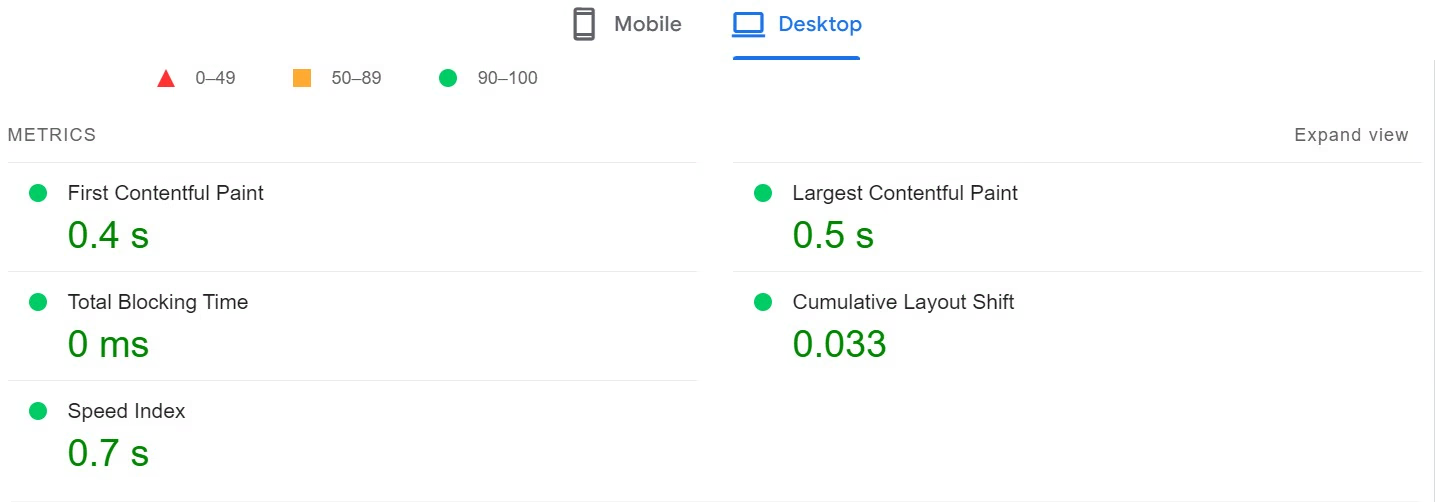
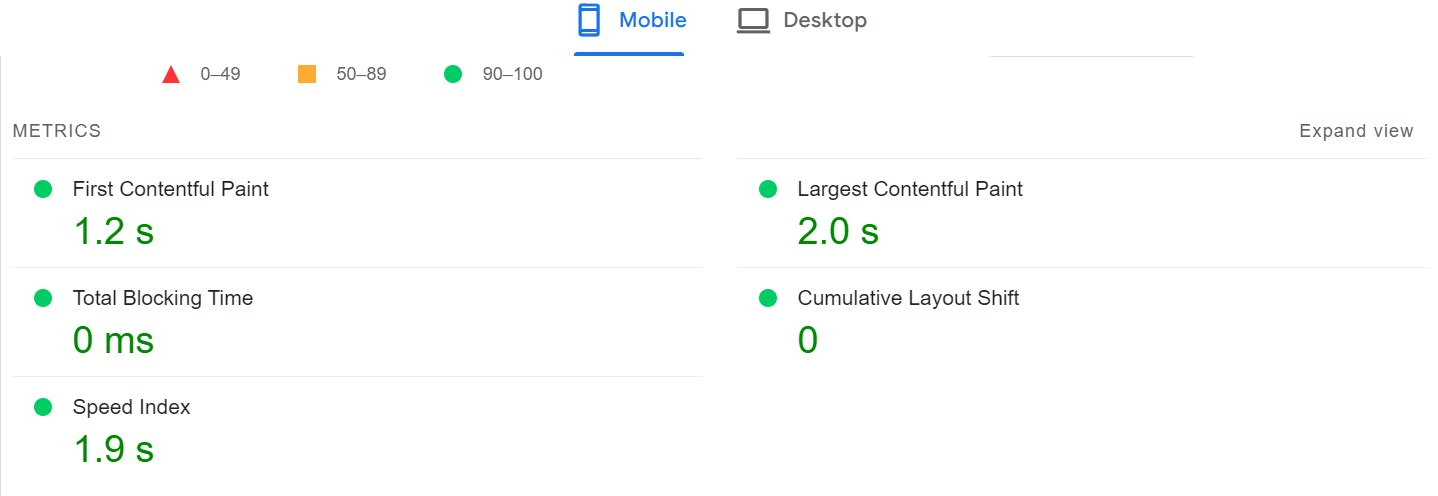
Insights:
-
The performance runs smoothly on both mobile and desktop.
-
There are no layout shifts or delays when users interact.
-
It meets all of Google’s performance standards, which is good for SEO.
➡️ This means your visitors enjoy a fast and responsive experience, and Google appreciates that. You can check above perfomnace testing result.
Please Note:
The performance results come from testing a site on Hostinger. Keep in mind that actual performance can change based on things like scripts, CSS files, media, plugins, and third-party tools. Sites with lots of content or complex features might load at different speeds and have varying Core Web Vitals. To improve performance, try to cut down on render-blocking resources, use browser caching, and optimize your images to fit your site’s needs.
5. Stress Test – Can Hostinger Handle Traffic Surges?
We ran a stress of the server of the hostinger using the loadster to simulate heavy traffic. The test lasted for 5 minutes with 3 minutes at peak load.
Test Setup Result:
-
Test duration: 5 minutes (3 minutes at peak load)
-
Requests sent: 17,059 total
-
Avg. response time: 1.28s (from USA server)
-
Errors: 0 (no 503s or timeouts)

Insights:
-
Even under heavy load, Hostinger performed really well.
-
The server stayed up and running without crashing or slowing down, even with over 17,000 requests.
➡️ Conclusion: So, in conclusion, it’s a great option for small to medium businesses, WooCommerce stores, or marketing campaigns that anticipate spikes in visitors.
My Final Verdict on Hostinger Performance Review
After testing Hostinger’s Premium Hosting plan, it lives up to its good reputation with:
-
Fast speeds, particularly in Asia, Europe and US (Closer the Server location, faster the speed)
-
Great uptime and reliability worldwide
-
Good resilience under stress
-
Meets Google’s Core Web Vitals
For WooCommerce stores, agency websites, or blogs that need speed and stability, Hostinger is a great pick backed by real results.
User Experience Insights from Hostinger Review
1. Real Impressions from Setup to Site Launch
When we try out any web hosting service, the main thing we focus on is the actual user experience, not just the specs. Hostinger claims to make things simple, from registering a domain to launching a WordPress site. But does it really work?
After using their Premium Hosting Plan, here’s what we found.
1️⃣ Easy Hosting & Domain Setup for Newbies
Let’s face it — web hosting can be a bit scary if you’re just starting out. Things like DNS records and SSL can be confusing.
That said, Hostinger makes the whole onboarding process easy. Their custom hPanel dashboard is clean and way more user-friendly than the usual cPanel.
✅ Our Experience:
-
After buying, we were taken through a simple setup wizard for WordPress. There were no manual uploads or complicated database steps.
-
Registering a domain during checkout was a breeze. Pricing was clear, and there were no annoying upsells.
-
Right after payment, we were directed to the dashboard. Our service showed as Pending Setup, and in just a few minutes, our site was live.
It was like setting up a Netflix account — but for our website.
2️⃣ Helpful Tips Without the Tech Speak
Hostinger doesn’t act like everyone knows the tech lingo. During the setup, you’ll see:
-
Helpful tooltips that explain tricky terms (like DNS propagation)
-
A progress bar to keep you updated on installation steps
-
Pre-installed SSL and easy-to-use security settings
For folks who are more experienced, these might seem simple, but for beginners, it’s a breath of fresh air. We even had a non-techy friend try it, and they registered a domain and set up WordPress in under 15 minutes, all on their own.
3️⃣ Flexible Payment & Quick Access
Hostinger offers various payment options, which is super helpful. No matter where you are — India, the US, or Europe — you’ll likely find a method that fits.
In our experience:
-
We used a UPI payment in India and had no issues.
-
Within 1–2 minutes of payment, our services were visible in the dashboard.
-
No waiting for emails or confusing redirects.
Step-by-Step Hostinger Setup (With Screenshots)
In this section, I’ll take you through how I set up my hosting with Hostinger, complete with screenshots so you know what to expect. Whether you’re starting a new site or moving one over, this guide makes things easy.
1. Dashboard & Pending Setup
After you confirm your payment, you’ll land on the Hostinger Dashboard. In the “Pending Setup” area, your new hosting package will be shown.

👉 This is a handy spot to see what’s next without getting lost in all the tech stuff.
2. Create or Migrate a Website
When you click on “Pending Hosting,” you’ll see two choices:
- Create a Website
- Migrate a Website
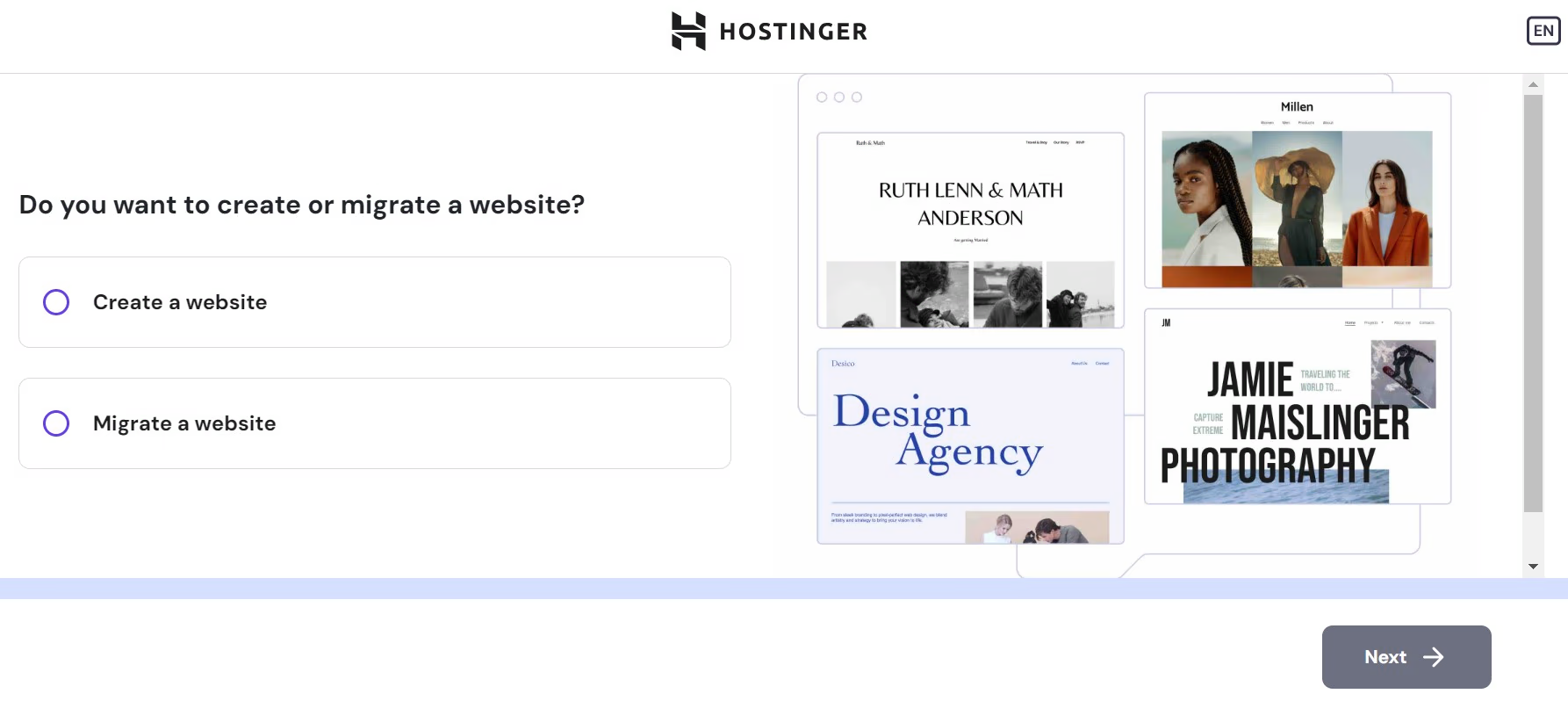
👉 If you have a website already, Hostinger can help you move it over for free automated migration, especially for platforms like WordPress and Joomla. It takes away a lot of the usual headaches.
In this demostration I chose to create a new site, so here’s how that worked:
3. Choose Your Builder: WordPress or Hostinger
On the next screen, you can choose between:
- WordPress (which I recommend for its flexibility and plugin options)
- Hostinger Website Builder (easy drag-and-drop design)
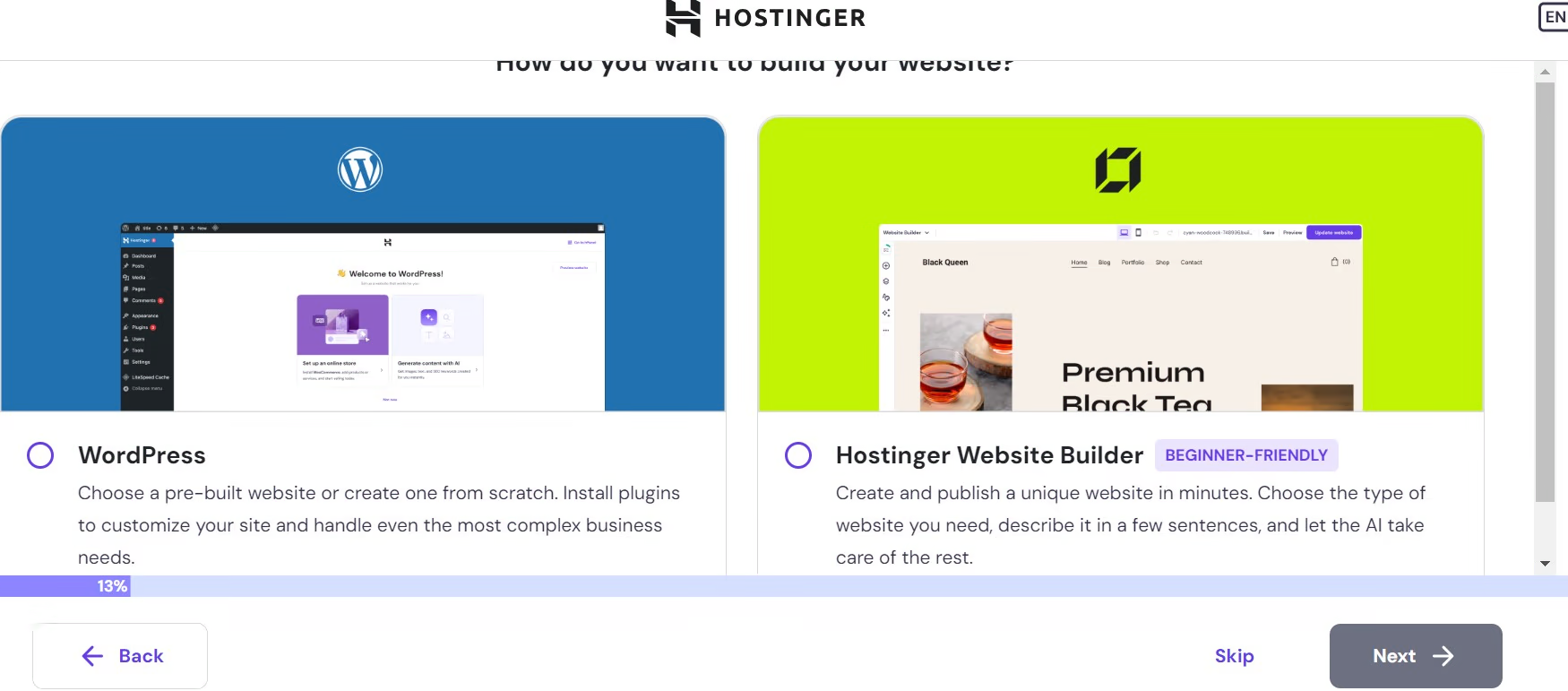
👉 I picked WordPress since it’s popular and great for growth.
4. Set Up Your Domain
If you’ve got a domain already, you can connect it here. If not, you can:
- Buy a domain directly from Hostinger
- Or Use one from another provider (like Namecheap or GoDaddy)
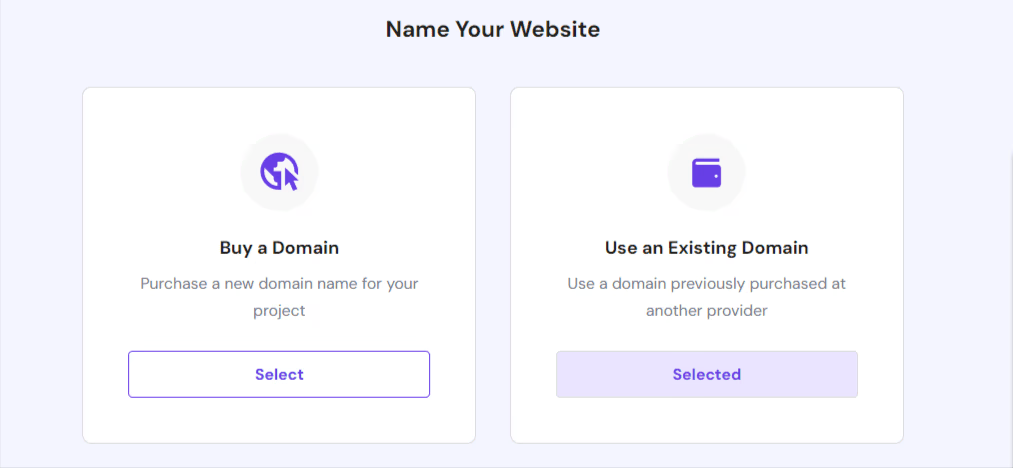
👉 I used a domain I bought elsewhere and set up the DNS myself.
5. Choose Hosting Server Location
You can select where your server is based — it’s best to pick a server location near your audience for better performance.
💡No stress if you pick the wrong spot; you can change it every 30 days.
6. Final Installation & DNS Configuration
Once everything is set up, Hostinger will automatically install WordPress and take you to the WordPress Dashboard.
👉 If you’re using a domain from another place, just update the DNS settings by pointing your domain’s nameservers to Hostinger’s IP (you’ll find this info clearly in your dashboard).

✅ Final Thoughts
Having set up many hosting environments over the years, I found Hostinger’s process really user-friendly. With clear visuals and straightforward steps, it’s easy for beginners but still flexible enough for advanced users.
If you’re helping clients or friends with their websites, check out this visual guide. It’s a handy template you can save or bookmark—makes things easier and helps them feel more at ease.
2. Hands-On with Hostinger’s hPanel: A Cleaner Alternative to cPanel
One great thing about using Hostinger is their own control panel, hPanel. It’s different from the usual cPanel most of hosting companies uses. Personaly for me hPanel feels more up-to-date and is easier.

You’ll find all the important stuff—like domain settings, SSL installation, email setup, and file management—just a few clicks away in a simple and clear organized dashboard.
➡️ Having worked with cPanel before, I found hPanel much easier to explain to my clients. It’s less intimidating for those just starting out with their first website.
Even experienced users will like how hPanel cuts out the clutter and puts the important tools right front and center.
✅ My Takeaway:
After managing several sites on different hosting platforms, I can say for sure that Hostinger’s hPanel makes hosting easier while still giving you enough control. It’s great for beginners but has plenty of features for those who are a bit more experienced.
3. One-Click CMS Installation — No Tech Headaches
Setting up a CMS (Content Management System) like WordPress or Joomla can often scare beginners — but not with Hostinger. Their One-Click Installer made it refreshingly painless.

Within a few seconds, I installed WordPress, entered my login credentials, and the system did the rest. You don’t have to worry about downloading files or messing with databases.
➡️ If you’re helping clients get online fast, this saves a ton of time. Even if you’ve never built a website, Hostinger makes it simple.
✅ My Takeaway:
I’ve installed CMS platforms manually before, and this one-click setup on Hostinger is a game-changer for those who aren’t tech-savvy and a huge time-saver for experts.
4. Hostinger’s AI Website Builder – Quick Start for Newbies
I tried out the AI Website Builder from Hostinger, and I was really surprised by how quickly it put together a website with just a few inputs.

Here’s how it works:
-
You fill out some questions about your business type and what you want to achieve.
-
The AI will create a layout and content plan based on what you tell it.
-
You can either go with its suggestions or change things up to fit your style.
➡️ This is a solid choice for anyone who wants to build a website without needing to know how to code or design.
If you want to have more say in how your site looks and operates, I suggest giving WordPress a try along with builders like Elementor or GenerateBlocks. They really let you customize things and add features easily.
✅ My Takeaway:
I’ve built a lot of WordPress sites over the years, but I can see the real benefits of Hostinger’s AI tool. It’s especially helpful for small business owners or freelancers who just want to get their site up quickly without getting bogged down in tech stuff.
Hostinger Customer Support: My Honest Experience
Getting help when things go sideways is one of the most important parts of any hosting service. So during my hands-on testing, I made sure to actually use Hostinger’s support — not just read about it.
| Support Feature | Available? | Details |
|---|---|---|
| Live Chat (24/7) | ✅ Yes | Fast response, available round-the-clock |
| Email Support | ✅ Yes | Great for follow-up or documentation |
| Ticket System | ✅ Yes | Track technical issues step-by-step |
| Phone Support | ❌ No | Not offered at this time |
| Knowledge Base | ✅ Yes | Extensive guides and tutorials available |
| AI Chatbot (Kodee) | ✅ Yes | Instant answers for common questions |
Lets discussed my real experience with hostinger support systems in detail —
1. Live Chat: Friendly, But Sometimes Slow
Hostinger offers 24/7 live chat, which sounds great on paper. I used it when I ran into a hiccup while connecting a third-party domain — nothing major, but something that would trip up a beginner.
It took about 2 – 3 minutes to get connected to a support agent. I feel it was very fast chat support with the Live human. The person who helped me was polite and genuinely helpful, not just copy-pasting from a script. They even followed up with a quick recap of what I needed to double-check with the request.
📝 Note: If you’re used to instant replies, be prepared for a bit of a wait during busy hours — it’s not always instant.

2. Email and Knowledge Base: Better Than Expected
For less time-sensitive questions (like renewal policies or plan upgrades), I used email support. Response times were slower — around 5 to 8 hours — but the replies felt personal and answered my actual question without back-and-forth.
More than once though, I didn’t even need to contact support. Hostinger’s Knowledge Base is actually solid. I followed guides to:
- Point my domain from Namecheap to Hostinger
- Set up professional email
- Adjust my PHP version and more
The instructions were clear and easy to follow — no jargon overload.
3. Hostinger’s AI Chatbot – Kodee
Kodee, Hostinger’s AI chatbot, is a notable addition to their support system. Honestly, many chatbots are too basic or annoying, but Kodee surprised me.
It won’t replace live support, especially for tricky issues, but it’s good for quick answers, dashboard navigation, and setup tasks like domain pointing or WordPress installs. It’s available 24/7 and answers common questions way faster than waiting in line for help.
I’ve tested it several times, and Kodee understands the platform quite well—better than most chatbots. Hostinger clearly put effort into training it around real hosting needs.

I had a few more questions about Hostinger’s uptime and how to clear the cache from the dashboard. So, I thought I would try out their AI chatbot, Kodee. I was pretty surprised when it responded fast with clear and helpful answers, which made everything easier and saved me some time.

In short, Kodee isn’t here to take over human support, but it definitely speeds up Hostinger’s help system—great for beginners or simple tasks.
✅ My Real-World Takeaway:
After using different hosts over the years — including Bluehost, SiteGround, and Namecheap — I’d say Hostinger’s support feels designed for beginners who still want the option to dig a bit deeper.
Live chat is helpful but not lightning-fast. Email works fine for non-urgent stuff. And the Knowledge Base? Surprisingly useful — I bookmarked it.
🎯 My Thought:
Support isn’t just about having a chat option. It’s about how easy it is to solve your problem, and Hostinger did pretty well in that area. Not perfect, but more than good enough to get things done — especially if you’re building your first or second site.
Final Thoughts: Is Hostinger Worth It in 2026?
After using Hostinger personally for a handful of client sites and one of my own side projects, I can say it’s genuinely impressive — especially for what you pay upfront.
If you’re just getting started or running a small business site, it hits most of the right notes:
-
Clean dashboard
-
Fast performance (thanks to LiteSpeed)
-
Tools like WordPress auto-installer and an AI website builder that actually work
Setting things up was easy because everything was clearly laid out. I didn’t have to search through menus to get to the DNS settings or install my SSL. And honestly, for non-techy users, that’s a big deal.
Not Everything Is Perfect
There are trade-offs, though. Hostinger doesn’t offer phone support, and sometimes the live chat can feel slower than you’d like — especially if you’re troubleshooting something urgent.
And while the intro pricing is super competitive, the renewal prices are higher than what you initially pay. It’s not hidden, but it’s worth being aware of before you commit.
Would I Recommend It?
Yes — if you’re looking for solid, affordable hosting and can work with chat support instead of calling someone, Hostinger is a smart pick.
But if you’re managing a large-scale, business-critical site that received very high traffic or want white-glove support, I sugged considuring looking for a different hosting providers that better suite like Bluehost.
In short: Hostinger is ideal for beginners, small to mid sized websites that need speed, stability, and affordability — without the tech overwhelm.
🔥 Limited-Time Bonus: Extra 20% OFF Hostinger’s Biggest Deal
Get 20% extra OFF — on top of Hostinger’s 77% deal!
👉 Unlock Extra 20% Savings NowUnlock this exclusive bonus discount with our special link – no coupon code required. Limited-time offer!
Personally Tried and Recommended 6 Top Hosting Providers of 2026: Find the Perfect Fit for Your Website!
Hostinger vs GoDaddy (2026): Which One Is Better ? (A Quick Comparison Table)
| Factors | Hostinger | GoDaddy |
|---|---|---|
| ⭐ Rating | 4.7 | 4.1 |
| 💲 Price | ₹149.00/month ($2.99/month) | Start with ₹199 |
| ⚡ Speed | 1.1 sec | 2.22 sec |
| 🕒 Uptime | 99.9% | 99.9% |
| 🔗 Free Domain | ✅ Yes | ✅ Yes |
| 🌎 Data Centers | India, US, UK, Asia, and South America | NY, LA |
| ➡️ Migrations | Unlimited | 1 |
| 👨💻 Support | Live Chat, Email, Phone | Live Chat |
| 🛡️ Security | Free SSL, DDoS Protection, 2FA, Firewall, Malware Protection, Vulnerability detection, Domain WHOIS Protection, IP Blocking | Free SSL, DDoS Protection |
| 🔄 Backups | Weekly Backups, Daily Backup* | Daily, 30 days |
| 💰 Money Back Guarantee | 30 Days | 30 days |
| 🔥 Coupon Code | Hostinger coupon 78% + 20% OFF extra | Save 65% for 3yrs turm |
| 🔍 Review | Read Review | Read Review |
Reviewed & Tested by Our Team Top 10 Free Hosting Providers of 2026: Your Ultimate Guide
FAQs
Is Hostinger good for beginners in 2026?
Yes, definitely. From my experience helping clients and running personal projects on Hostinger, it’s one of the most beginner-friendly hosting platforms out there. The dashboard is clean, simple to navigate, and packed with one-click tools like WordPress installs, making it a great choice if you’re just starting out.
How fast is Hostinger’s web hosting?
Hostinger uses LiteSpeed servers, and in my real-world tests, websites loaded noticeably faster than many other budget hosts. With optimized caching and built-in performance tools, the speed is more than enough for blogs, business sites, and small eCommerce stores.
Can I rely on Hostinger’s customer support?
I’ve personally reached out to Hostinger support multiple times in 2026, and while their live chat isn’t instant, the responses are usually helpful and friendly. Their support team handles technical questions decently well, especially if you give clear details about your issue.
Does Hostinger really offer value for money?
Yes—and this comes from hands-on use. For the price, you get solid performance, free SSL, a domain name (with some plans), and useful tools like their AI website builder. Compared to what you pay, the overall package is one of the best in the shared hosting space.
Is Hostinger suitable for professional or growing websites?
For small to mid-sized businesses, Hostinger is fine. I’ve seen decent uptime and stability on client sites. But if you’re expecting heavy traffic or running a large WooCommerce store, you might eventually need to upgrade to a VPS or cloud hosting plan.
What’s the biggest downside I noticed?
From my perspective, the biggest trade-off is their limited support speed during peak times. Also, advanced users might miss some flexibility compared to hosts with cPanel or custom server-level controls.
Would I personally recommend Hostinger in 2026?
Yes, especially for beginners, bloggers, and small businesses looking for affordable yet fast hosting. After testing it thoroughly in 2026, it’s one of the few budget hosts I’d actually recommend based on hands-on experience—not just specs.


